If you have had an email since the global Microsoft 365 outage asking you to “restore your messages” before they are deleted, treat it as a scam. On 14 November 2026, Microsoft Threat Intelligence said it had seen an active campaign impersonating Microsoft 365 service-health notices, iTnews reported. The lures quote a real incident ID, invent a short deadline, and push you towards a button. They are not how Microsoft tells you the service is back.
We have already covered what went down, Microsoft’s explanation and the UK impact in our Microsoft 365 outage explainer. This piece is only about the phishing that followed.
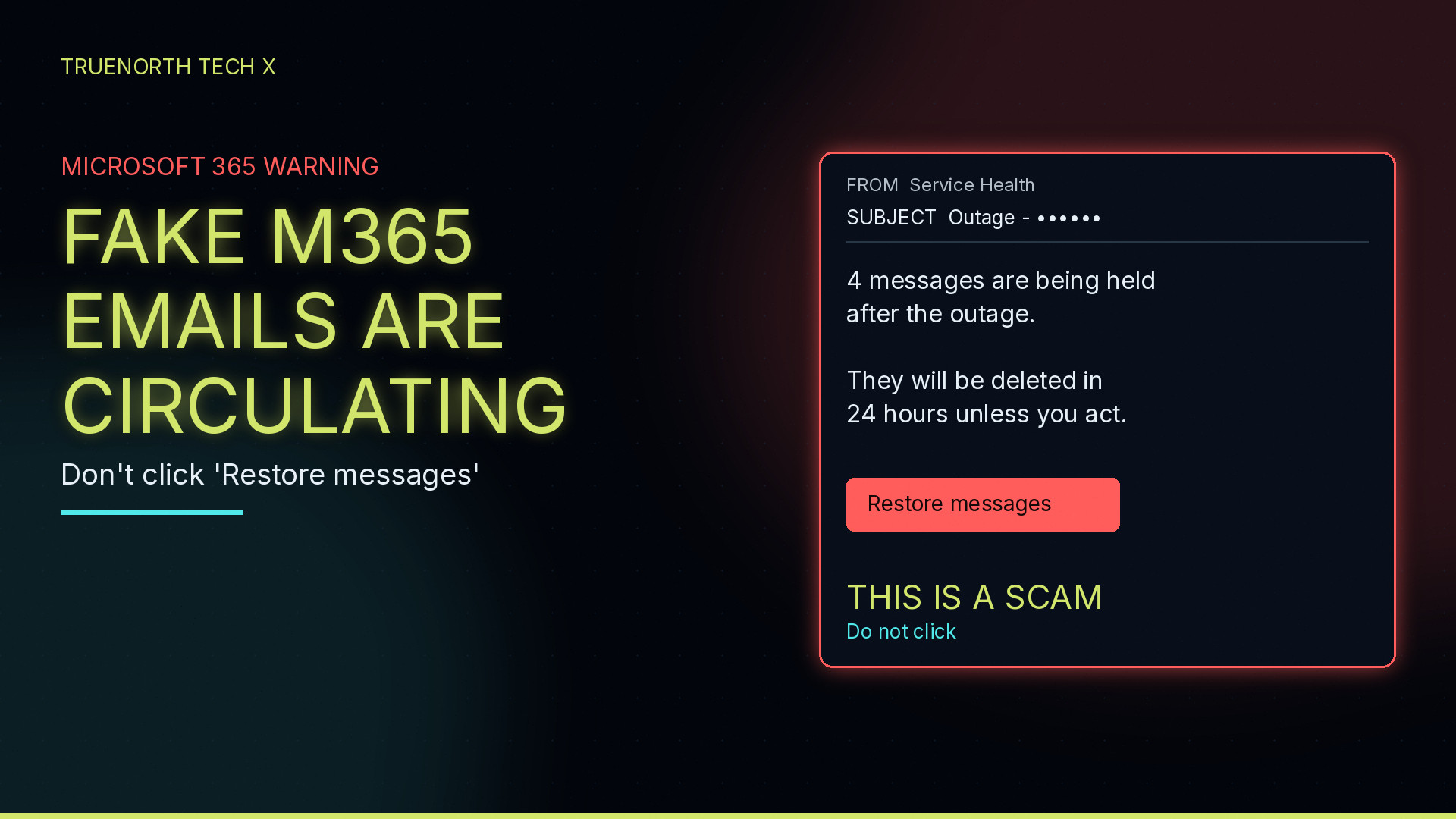
What the fake emails look like
Microsoft, quoted by iTnews, said the campaign referenced the genuine Exchange Online incident ID EX1550543. Some of the emails it detected claimed that messages had been held during the outage and would be deleted within 24 hours unless the recipient clicked to restore them. Subjects followed the pattern “Outage – [six-character code]”. Sender display names used organisation-specific prefixes, followed by “Outage Notification” or “Service Health”.
Mimecast, writing on 14 November, described two themes it had seen within hours of the 12 November disruption. In the first, the email claims Exchange Online mail flow was interrupted on 12 November, cites EX1550543, and says four messages are held and will be deleted within 24 hours unless they are released. The button reads “Restore messages.” In the second, a “DOMAIN Support-Desk” header (sometimes with the word DOMAIN left unfilled) says one security issue was found on the account and offers a “Take action” button. Display names it listed include “Service Health”, “Health Status” and “Mail-Restore-Auth”. Subjects began “Outage -“, and it also saw “Restore –” and “Strengthen-Security”.
One detail to flag: iTnews, citing Microsoft, and Field Effect both describe a six-character code after “Outage -“. Mimecast said the random tokens in the examples it examined were 20 and 16 characters. The shared pattern is a subject starting “Outage -” plus a random string, not a single official length.
Field Effect, in a 13 November note, said a “RESTORE MESSAGES” button leads to a credential-harvesting page, and that the same text had been reported at other organisations. Microsoft, via iTnews, described the activity as consistent with credential phishing but said that had not been confirmed. Mimecast said it was blocking the campaign’s links so that clicks are stopped before a phishing page. We are repeating those attributions rather than treating any one of them as a lab test of our own.
Other outage-themed variants
The held-messages lure is not the only one in circulation. Field Effect said warnings about fake Outlook password-reset emails and texts appeared within hours on 12 November. It also pointed to other reported variants: account-recovery or MFA-change offers, a Microsoft 365 notice claiming inactive accounts were being deactivated, fake support calls and password-reset links, and even payment-redirection texts that exploit the fact email really was down. Treat any unexpected “reset your Outlook password” message the same way: do not follow the link; change a password only through a site or app you opened yourself.
A short spot-the-fake checklist
- An unexpected “restore your messages” or “security issue found” notice, especially with a 24-hour deletion deadline and a single button (“Restore messages” or “Take action”).
- A subject that starts “Outage -” and then a random code, or similar “Restore” / “Strengthen-Security” subjects.
- A display name such as Service Health, Health Status, Outage Notification or Mail-Restore-Auth. Read the actual sender address, not just the name at the top.
- A real-looking incident ID such as EX1550543. A genuine ID does not make the email genuine; Microsoft and Field Effect say that is part of the trick.
- Clumsy wording or an unfilled “DOMAIN” placeholder, which Mimecast flagged as a giveaway.
- A tracking link that looks tidy. Mimecast noted that SendGrid click-tracking can hide the real destination, so a “clean” URL is not proof of safety.
- If you need a real outage status, open the Microsoft 365 admin centre Service health page yourself. Field Effect says that is where Microsoft posts outage updates, and that genuine quarantine digests come from [email protected] with the subject “Microsoft 365 security: You have messages in quarantine.”
If you entered a password, or clicked
If you typed a password or approved a sign-in prompt, act as if that account is compromised. Change the password on a page or app you opened yourself, not from the email. Check your multi-factor authentication methods and remove anything you do not recognise. Review recent sign-in activity and sign out other sessions.
If it is a work account, tell IT straight away. Field Effect’s advice for security teams is worth following even as a prompt for individuals: look for new inbox rules, forwarding, unexpected MFA registrations and unusual sign-in locations. A password change alone may not remove a forwarding rule or a new sign-in method that was added with the stolen credentials.
If you only opened the email and did not click or sign in, you can delete it and mention it to IT so they can block the campaign. Do not forward the original as a curiosity without warning, in case someone else clicks.
FAQ
Is a ‘restore your messages’ email after the Microsoft 365 outage genuine?
Treat it as a scam until you have checked another way. Microsoft Threat Intelligence, quoted by iTnews on 14 November 2026, said it had seen emails impersonating Microsoft 365 service-health notices and citing the real Exchange Online incident ID EX1550543. Field Effect and Mimecast describe the same ‘held messages’ lure, with a Restore messages button. Real outage updates appear in the Microsoft 365 admin centre Service health page, not in an unexpected email with a deadline.
How can I tell these outage emails are fake?
Look for a subject starting ‘Outage -‘ plus a random code, a display name such as Service Health, a claim that a set number of messages are held and will be deleted within 24 hours, and a single Restore messages or Take action button. Mimecast also flagged sloppy template text, including a leftover DOMAIN placeholder. Do not trust a clean-looking tracking link: the real destination can be hidden.
What should I do if I entered my password?
Change that password, check your MFA methods and recent sign-in activity, sign out other sessions, and tell your IT team if it is a work account. Field Effect also advises checking for new inbox rules, forwarding and unexpected MFA registrations, because a password change alone may not remove what an attacker added.
Where should I look for real Microsoft 365 outage updates?
Field Effect says Microsoft posts outage updates only on the Microsoft 365 admin centre Service health page. Genuine quarantine digests, it adds, come from [email protected] with the subject ‘Microsoft 365 security: You have messages in quarantine.’ If in doubt, open the admin centre yourself rather than following a link in an email.
Enjoyed this? Follow along for more guides and deals. More guidesXInstagramFacebookWhatsAppTelegram