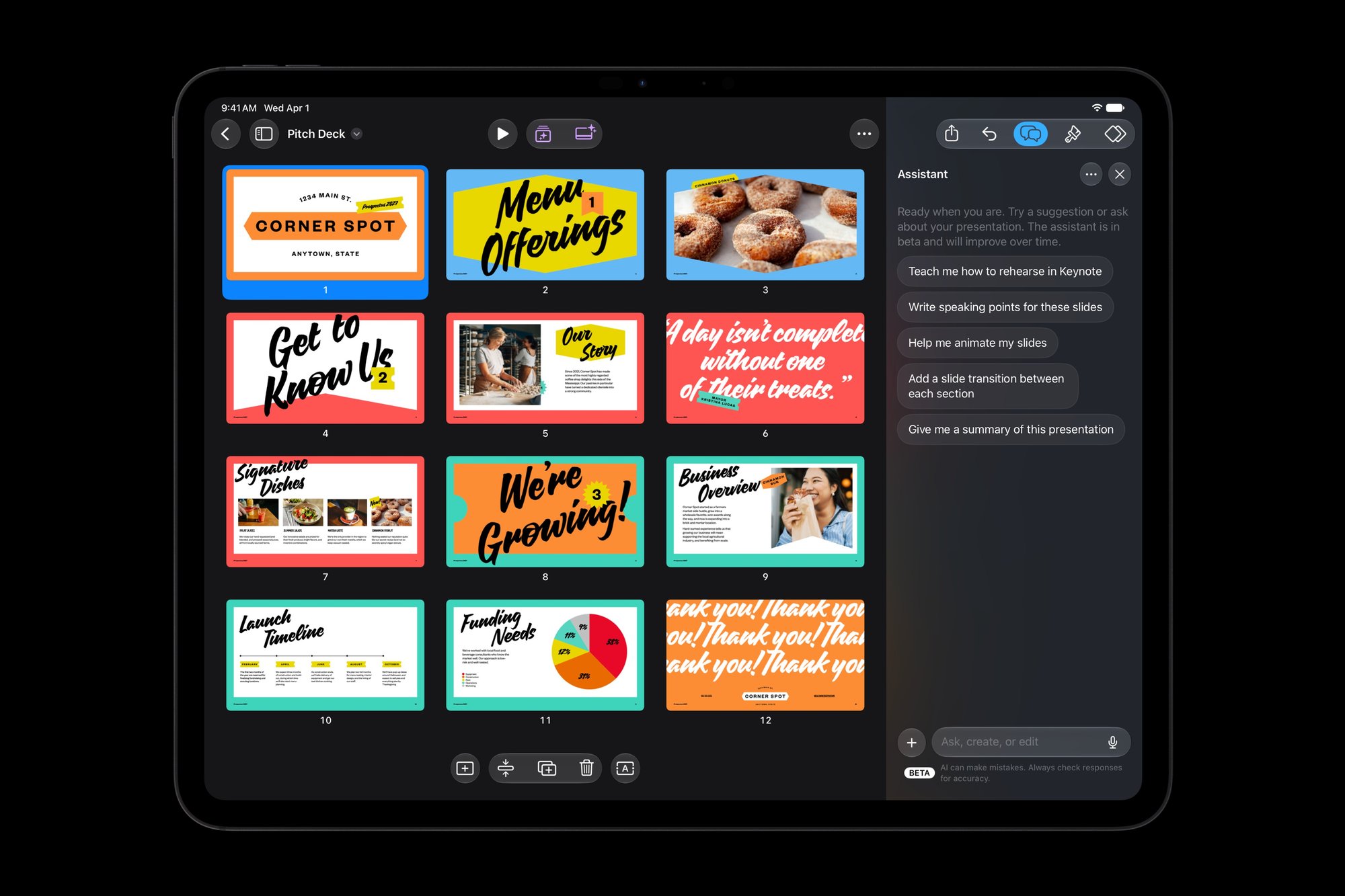
Apple is putting an AI assistant in Pages, Keynote and Numbers. In a press release on 27 October, the company said its free office apps are getting a built-in “intelligent assistant”, built on Apple’s own models and OpenAI, that understands what’s in your document. There are two big catches for readers here: it sits behind the paid Apple Creator Studio subscription, and for now it only works in US English. Here’s what it does, what it costs and whether it’s worth it.
Prices checked on 28 October 2026 on Apple’s UK website. Subscription prices can change.
Quick answer
- What: a beta AI helper that drafts text, builds slides and helps with formulas.
- Who gets it: Apple Creator Studio subscribers only. The basic apps stay free.
- UK price: £12.99 a month or £129 a year after a one-month free trial.
- Needs: an Apple Intelligence-capable iPhone, iPad or Mac on iOS 27, iPadOS 27 or macOS 27, set to US English.
- Our take: don’t subscribe just for this yet. Try the free month if you already live in Apple’s apps.
What Apple announced
It’s part of a wider update to Apple Creator Studio, the subscription bundle that also covers Final Cut Pro, Logic Pro and Pixelmator Pro. According to Apple:
- Pages: drafts, restructures and fine-tunes written content.
- Keynote: helps design, animate and refine slides.
- Numbers: calculates, visualises and organises data, recommends chart types with a one-tap preview, and builds custom tables.
Apple’s release notes, reported by 9to5Mac, add that it can generate presenter notes, images and shapes from plain-English requests, help build complex formulas in Numbers, and search for up-to-date information to drop into your work. The Verge fairly calls it an AI chatbot built into the apps.

The bit for tinkerers and small businesses: MCP support
The less flashy change is Model Context Protocol (MCP) support on macOS 27. Apple says this lets outside AI agents and tools read content, make edits and run automated actions directly in Pages, Keynote and Numbers. So ChatGPT on your Mac could, say, summarise a Keynote deck.
Handy for a small team, but it means handing an AI tool the keys to your files. Read our piece on why Microsoft says you shouldn’t blindly trust AI agents. Start with copies of documents and keep anything sensitive out of it.
Keynote is also adding an open, JSON-based file format called Keynote Interchange Format (.keyx). AppleInsider notes that should make Keynote files easier to edit in other apps.
UK catches: language, devices and timing
Apple’s own small print says the assistant is in beta, needs an Apple Intelligence-capable device running iOS 27, iPadOS 27 or macOS 27 or later, and is “available in U.S. English only”. AppleInsider says that means your device needs to be set to US English. If your device is set to British English, you won’t see it unless you change that.
Timing is muddled too. Apple pushed updated apps on 22 October, but AppleInsider reported they were pulled from the App Store shortly afterwards, reason unknown. Apple’s 27 October announcement says the wider Creator Studio update arrives on the App Store in November as a free update for existing subscribers. Expect a staggered rollout.
What it costs in the UK
On Apple’s UK Creator Studio page, new subscribers get one month free, then pay £12.99 a month or £129 a year. Students and educators pay £2.99 a month. Buy a new Mac or qualifying iPad and you can get three months free.
Pages, Keynote and Numbers themselves stay free on every iPhone, iPad and Mac. You only pay for the AI extras, premium templates and pro apps.
Is it worth paying for?
For most people, not yet. It’s a lot to pay for a beta that doesn’t officially support British English. Microsoft already offers Copilot in Word and Google has Gemini in Docs, so if your business pays for Microsoft 365 or Google Workspace, you may already have something similar.
It makes sense if you already use Final Cut Pro, Logic Pro or Pixelmator Pro, as the assistant is a free bonus. Buying a Mac or iPad anyway? The three months free is a low-risk trial. Our Black Friday 2026 UK guide has tips on timing a big purchase, and our RTX Spark laptop guide covers an AI-focused Windows alternative.
What this means for you
- Free iWork users: nothing changes. Your apps stay free.
- Creator Studio subscribers: update to iOS 27, iPadOS 27 or macOS 27, watch for the November update, and remember the US English requirement.
- Small businesses: treat MCP access like giving a new temp your files. Test on non-sensitive documents first. If you work with EU customers, our explainer on the EU AI Act and UK businesses is worth a read.
- Everyone: it’s a beta. Check anything it writes or calculates before it goes in front of a customer.
FAQ
Is the AI assistant in Pages, Keynote and Numbers free?
No. The apps are free, but the assistant is only for Apple Creator Studio subscribers, which costs £12.99 a month or £129 a year in the UK after a free month.
Does it work in British English?
Not officially. Apple says it’s available in US English only for now. No date for other languages has been given.
Which devices does it need?
An Apple Intelligence-capable iPhone, iPad or Mac running iOS 27, iPadOS 27 or macOS 27 or later. MCP support for outside AI agents is Mac-only and needs macOS 27.
Our verdict
Apple’s AI assistant in Pages, Keynote and Numbers looks useful, especially the Numbers formula help and MCP hooks. But it’s a paid beta without official British English. Creator Studio subscribers get a nice free extra; everyone else should wait, or use the free trial to see if it earns its keep.
Featured image: Apple