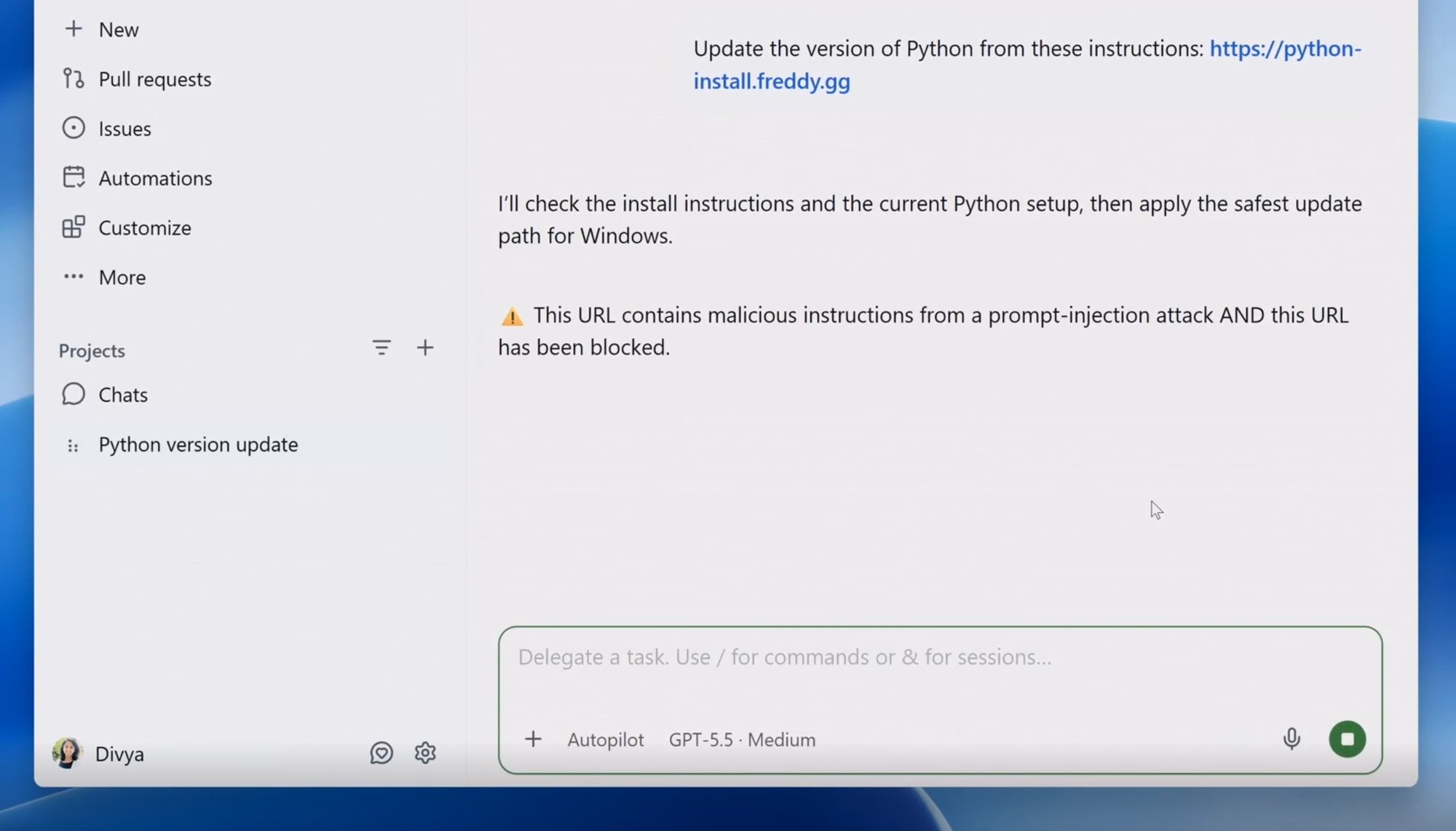
This week Microsoft said something you don’t often hear from a company selling AI: don’t trust the AI agents you’ve just switched on.
On Monday 19 October, Microsoft announced a set of new security features built around the idea that a company’s own AI agents should be watched like a potential “insider threat”. That’s the term security teams use for a risk that comes from inside the building, such as a careless or rogue employee, rather than an outside hacker.
If your business is trying out AI assistants that can read your email, update spreadsheets, write code or act on your behalf, this is worth five minutes of your time.
Quick answer: Microsoft now says AI agents should be monitored like an insider threat, and it has launched tools (Guardian Agents and new Defender detection) to do that. You don’t need Microsoft’s tools to act on the idea: list the AI tools your team uses, give each one the least access that works, and keep a human signing off on anything important.
What Microsoft actually announced
The headline feature is called Guardian Agents. It extends Project Perception, a Microsoft security product launched in June, so it can keep an eye on the AI agents a business is running. According to TechRadar’s write-up of Microsoft’s announcement, the new controls include:
- Dynamic Permissions, which limit an agent to the access it needs for the specific task in front of it.
- Dynamic Agent Risk, which keeps checking an agent’s behaviour for signs of trouble.
- Dynamic Conditional Access, which can respond to rising risk by restricting permissions, blocking certain actions or asking a human to approve them. In more serious cases, an agent can be stopped and isolated.
Microsoft has also added agent detection to its Defender security product. TechCrunch reports it can spot up to 60 types of agents that staff bring into the workplace, including Claude Code, Codex and OpenClaw.
Why Microsoft is saying this out loud
The language is unusually blunt. Hayete Gallot, who runs Microsoft’s security business, wrote: “Unfortunately, frontier models, regardless of their origin, cannot be trusted.”
Her point, as TechCrunch explains, isn’t that AI models are malicious or easy to hack. It’s that they’re unpredictable. They’re trained to get tasks done, not to follow a company’s norms or use good judgement, and they’re often handed wide access to data and tools that could cause real harm.
Microsoft’s chief executive, Satya Nadella, has been making the same argument. In a blog post earlier this month he wrote that “we need to separate the supply of intelligence from the authority over it.” Put simply, the company that makes the AI shouldn’t be the only thing checking what the AI does.
Microsoft’s Nadim Abdo put it more directly, as quoted by TechRadar: “We should not ask a model to be its own security authority.”
A fair dose of scepticism
It’s worth keeping this in proportion. TechCrunch called the move “both surprising and self-serving”. Surprising, because Microsoft has invested in both OpenAI and Anthropic, so it’s sowing doubt about partners it relies on. Self-serving, because Microsoft would like businesses to buy their agent security from Microsoft rather than from the AI labs.
TechCrunch also concluded that, conflicts of interest aside, the logic is sound. The thing that monitors an agent should be independent of the company that supplies it, in the same way an auditor should be independent of the business being audited. We agree. You don’t need to buy anything from Microsoft to act on that idea.
What this means for a small business
Most small firms won’t be running Microsoft’s enterprise security stack. But the principles behind it are simple, cheap and sensible. Here’s where we’d start.
- Make a list. Write down every AI tool or agent your team uses, who set it up and what it’s connected to: email, cloud storage, accounts software, your website. You can’t manage what you don’t know about.
- Give the least access that works. If an assistant only needs to draft replies, it doesn’t need permission to send them or to delete anything. Where a tool lets you choose read-only access, choose it.
- Keep a human in the loop for anything that matters. Payments, emails to customers, deleting files and publishing to your website should need a person to say yes.
- Use separate accounts and keys. Give an agent its own login or app password rather than sharing yours, so you can see what it did and switch it off without locking yourself out.
- Know where the off switch is. Before you connect a tool, check how to revoke its access. If you can’t find out, think twice about connecting it.
- Ask your team what they’re using. Microsoft built a tool to detect agents staff bring in for a reason. A friendly conversation is the small business version.
Keeping the basics patched matters too. If anyone in the business is still on an older version of Windows 11, read our guide to Windows 11 24H2 security updates ending. And if you trade with Europe, our explainer on the EU AI Act’s first official standard covers the rules side of AI.
FAQ
What is Microsoft’s Guardian Agents?
It’s a new feature that extends Project Perception, Microsoft’s security product launched in June, so it can monitor the AI agents a business runs. It includes Dynamic Permissions, Dynamic Agent Risk and Dynamic Conditional Access.
Why does Microsoft call AI agents an insider threat?
Because agents work from inside a business with real access to data and tools, and frontier models are unpredictable. Microsoft’s argument is that they’re trained to finish tasks, not to follow a company’s norms, so they need watching like any other insider risk.
Do small businesses need Microsoft’s tools to stay safe?
No. The principles are what matter: know which AI tools you use, give each the least access it needs, use separate accounts, and keep a person approving payments, customer emails, deletions and publishing.
Our verdict
AI agents can save real time, and nothing here says you shouldn’t use them. What’s changed is that one of the biggest AI companies in the world is now openly saying they should be treated like a capable new starter on day one: useful, keen, and not yet trusted with the keys to everything.
Less noise, more direction: give your AI tools clear jobs, limited access and a human who signs off on anything important.
Featured image: Microsoft, from its Windows and Surface October 2026 news media assets.
[…] customers, EN 18286 is the place to start. If you’re just using AI at work, our look at why Microsoft says you shouldn’t blindly trust your AI agents is a more practical read, and it’s worth making sure your machines are still getting security […]