As an Amazon Associate, TrueNorth Tech X earns from qualifying purchases. Read our affiliate disclosure.
Run out of room on your console and you’ll soon hit the big question: Xbox Series X storage expansion card vs external SSD, which one’s worth your money? They look like they do the same job, but they don’t. One plays your newest games, the other mostly stores them. Get that straight and the choice is easy, and you might save a fair few quid by buying a bit of both.
Quick answer
- Buy an expansion card if you want to play Series X|S optimised games without shuffling them about. It matches the internal SSD.
- Buy an external USB SSD if most of your library is Xbox One, Xbox 360 or original Xbox games, or you just want a cheap “vault” to park games you’re not playing.
- Best value for most people: keep current games on the internal drive (plus a card if you can stretch to it) and use a USB SSD as overflow.
- Series S owners feel the squeeze first with 512GB, and the same cards fit both consoles.
Prices change often. Tap Check price on Amazon for today’s price.
| Product | Key spec | UK price at time of writing | Best for | Link |
|---|---|---|---|---|
| SanDisk Optimus GX C50 1TB | Xbox expansion slot, plays Series X|S games directly | Check price | Playing new games without moving them | View in our shop |
| Samsung T7 1TB | USB 3.2 Gen 2 portable SSD | Check price | A cheap vault and last-gen games | View in our shop |
| Crucial X9 2TB | USB-C portable SSD, 2TB | Check price | Big libraries on a budget | View in our shop |
| Samsung T9 2TB | USB 3.2 Gen 2×2 (capped on Xbox) | Check price | Sharing one drive between Xbox and PC | View in our shop |
How Xbox Series X|S storage works
There are three places a game can live on a Series X or Series S: the internal SSD, a storage expansion card in the slot on the back, or a USB drive. Microsoft’s own storage primer on Xbox Wire explains the split. The internal SSD and the expansion card both use the Xbox Velocity Architecture, and the card is designed to give “the exact same” performance as the internal drive. USB storage is there to carry your existing library across and to store newer games for quick transfer.
The key rule, confirmed by SanDisk’s Xbox setup guide and Seagate’s support pages: games optimised for Series X|S can’t be played from a USB drive. You can store them there, but you have to move them back to the internal SSD or an expansion card to play. Xbox One, Xbox 360 and original Xbox games are different. They’ll run straight off USB.
A USB drive also has to be at least 128GB and connected over USB 3.0 or later, otherwise the console only uses it for media.
The storage expansion card
For years Seagate was the only name in the slot. Now SanDisk has joined in with the Optimus GX C50, which SanDisk says is officially licensed for Xbox Series X|S. It comes in 512GB, 1TB and 2TB, works with Quick Resume, and carries a five-year limited warranty. Our shop stocks the 1TB version.
Pros
- Plays Series X|S optimised games directly, at the same speed as the internal SSD
- Tiny and plugs straight into the back, with no cables or setup
- Works on both Series X and Series S
Cons
- Costs a lot more per terabyte than a USB SSD
- Only works in an Xbox, so it’s no use for your PC or laptop
An external USB SSD
A USB SSD is the budget option and the flexible one. It’ll run your backward-compatible games, hold Series X|S games you’re not playing right now, and work with a PC or laptop too. Moving a game back from a USB SSD to the internal drive is far quicker than downloading it again, which matters if your broadband is nowt special.
Don’t overspend on speed, though. Microsoft’s Series X spec sheet lists USB 3.1 Gen 1 ports, which top out at 5Gbps. That means very fast drives such as the Samsung T9, built for 20Gbps USB 3.2 Gen 2×2, can’t stretch their legs on an Xbox. Buy one only if you’ll also use it on a PC that can.
Pros
- Much cheaper per terabyte
- Plays Xbox One, 360 and original Xbox games directly
- Works with PCs and laptops as well
Cons
- Can’t play Series X|S optimised games, only store them
- Xbox formats the drive when you set it up, wiping anything already on it
The best-value combo
For most players we’d split it like this. Keep the games you’re playing this month on the internal SSD. If you’ve a big Game Pass habit and hate juggling, add an expansion card. Then put a 1TB or 2TB USB SSD alongside as a vault for everything else, plus any older games you dip into. Our best portable SSD guide covers the USB options in more detail, and if you’re still choosing a console, our Xbox Series S vs Series X comparison looks at how much storage each one really gives you.
How to move games between drives
The steps below follow Xbox Support’s transfer guide.
- Plug the drive in, and when the console asks, choose to format it for games (this wipes it).
- Go to Settings, then System, then Storage devices, and pick the drive the game is on.
- Choose Games and apps, highlight the game (or several), press the Menu button and select Move or copy.
- Pick where it should go. For a Series X|S game you want to play, that’s the internal SSD or the expansion card.
We’ve a step-by-step guide to adding storage to Xbox and PS5 if you’d like more detail, and the full range is in the storage section of our shop.
Verdict
If you want to play the newest games without thinking about it, the expansion card is the only option that does the job properly. It’s dearer, but it’s the real upgrade. If money’s tight, a USB SSD gets you most of the way: it runs your older games and stores the rest for a quick shuffle back. Plenty of people will end up with both, and that’s no bad thing. We haven’t tested these drives hands-on; the details here come from Microsoft, SanDisk and Seagate. See how we test and choose products.
FAQ
Can you play Series X games from an external SSD?
No. Games optimised for Xbox Series X|S can be stored on a USB drive but must be moved to the internal SSD or a storage expansion card to play. Xbox One, Xbox 360 and original Xbox games can run straight from USB.
Does the Xbox Series S use the same expansion card?
Yes. Expansion cards such as the SanDisk Optimus GX C50 and Seagate’s cards work in both the Series X and Series S.
Can I fit a normal M.2 SSD in the Xbox expansion slot?
No. The slot takes licensed Xbox storage expansion cards, not standard M.2 drives.
Does an external SSD need formatting for Xbox?
Yes. The console formats the drive when you choose to use it for games, which wipes anything already on it, so back it up first.
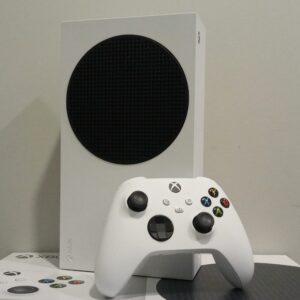
Featured image: Xbox Series S with controller, photo by AsmodeanUnderscore via Wikimedia Commons, CC BY-SA 4.0.